Here is a clear, real-world (LIVE) example of the Abstract Factory Design Pattern with Java implementation — exactly what is asked in interviews.
⭐ Real-World Example: Cross-Platform UI Component Factory
Imagine you are building software that must run on:
-
Windows
-
Mac
-
Linux
Each OS has its own style of:
-
Buttons
-
Checkboxes
-
Menus
Your application should not contain if-else everywhere to check OS type.
👉 Abstract Factory solves this.
It gives you one factory per family of related objects, and the client never knows which OS it is using.


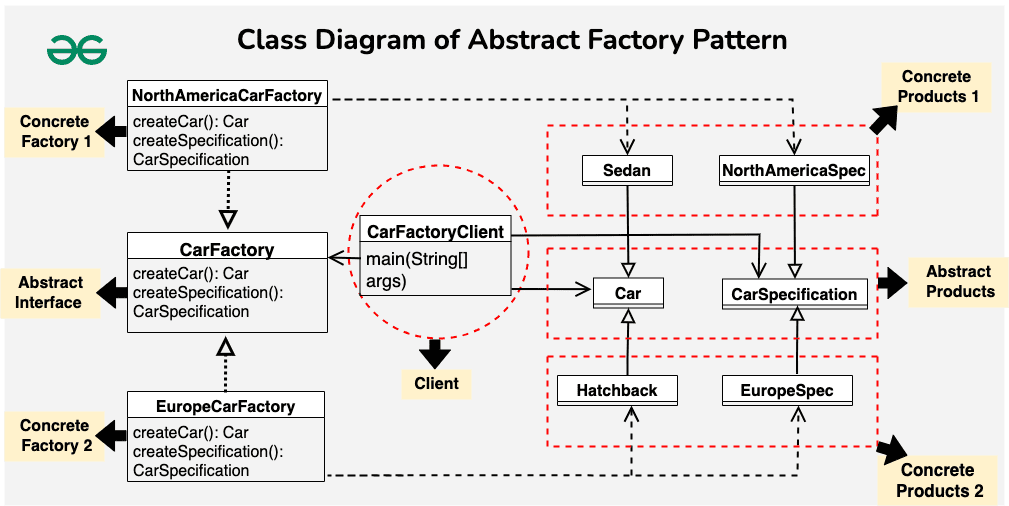
🎯 LIVE EXAMPLE: Create UI for Windows & Mac
You want to create UI components (Button, Checkbox) but the style depends on OS.
🧱 1️⃣ Product Interfaces (Common API)
interface Button {
    void paint();
}

interface Checkbox {
    void paint();
}
🪟 2️⃣ Concrete Products for Windows
class WindowsButton implements Button {
    @Override
    public void paint() {
        System.out.println("Windows style Button");
    }
}

class WindowsCheckbox implements Checkbox {
    @Override
    public void paint() {
        System.out.println("Windows style Checkbox");
    }
}
🍎 3️⃣ Concrete Products for Mac
class MacButton implements Button {
    @Override
    public void paint() {
        System.out.println("Mac style Button");
    }
}

class MacCheckbox implements Checkbox {
    @Override
    public void paint() {
        System.out.println("Mac style Checkbox");
    }
}
🏭 4️⃣ Abstract Factory (interface)
interface GUIFactory {
    Button createButton();
    Checkbox createCheckbox();
}
🏭 5️⃣ Concrete Factories
Windows Factory
class WindowsFactory implements GUIFactory {
    @Override
    public Button createButton() {
        return new WindowsButton();
    }

    @Override
    public Checkbox createCheckbox() {
        return new WindowsCheckbox();
    }
}
Mac Factory
class MacFactory implements GUIFactory {
    @Override
    public Button createButton() {
        return new MacButton();
    }

    @Override
    public Checkbox createCheckbox() {
        return new MacCheckbox();
    }
}
🎮 6️⃣ Client Code (Application Layer)
The client never knows the OS. It only uses the factory.
class Application {
    private Button button;
    private Checkbox checkbox;

    public Application(GUIFactory factory) {
        button = factory.createButton();
        checkbox = factory.createCheckbox();
    }

    public void paint() {
        button.paint();
        checkbox.paint();
    }
}
🚀 7️⃣ App Runner
public class Demo {
    public static void main(String[] args) {

        GUIFactory factory;
        String os = "WINDOWS"; // This could be detected dynamically

        if (os.equals("WINDOWS")) {
            factory = new WindowsFactory();
        } else {
            factory = new MacFactory();
        }

        Application app = new Application(factory);
        app.paint();
    }
}
⭐ OUTPUT
Windows style Button
Windows style Checkbox
If OS = Mac:
Mac style Button
Mac style Checkbox
📌 Where This is Used in Real Industry?
✔ 1. Spring Framework
Different beans for:
-
AWS
-
Azure
-
GCP
Using different factory configurations.
✔ 2. JDBC DriverManager
Creates different connection objects:
-
MySQLConnection
-
OracleConnection
✔ 3. UI Libraries
React Native, Flutter, Swing → create widgets based on platform.
✔ 4. Car Manufacturing System
Factory for:
-
Tesla components
-
BMW components
-
Audi components
Each family has:
-
Engine
-
Tyres
-
Dashboard
📝 Interview Summary (Best 2 Lines)
Abstract Factory creates families of related objects without specifying their concrete classes.
Example: A Cross-Platform UI library creates Windows Button + Windows Checkbox OR Mac Button + Mac Checkbox using a single factory.
No comments:
Post a Comment