Here is a clear, practical + architect-level explanation of Service Mesh and how to implement it in real microservices development.
I’ve also included diagrams to make it easy to understand. 👇
🚀 What is a Service Mesh? (Simple Definition)
A service mesh is an infrastructure layer that handles service-to-service communication automatically — without writing code.
It adds capabilities like:
✔ Load Balancing
✔ Service Discovery
✔ Security (mTLS)
✔ Traffic Routing
✔ Observability
✔ Retries / Timeouts / Circuit Breaking
✔ Zero-downtime deployments
All these are handled by sidecar proxies, not by your microservice code.
🏗️ How Service Mesh Works
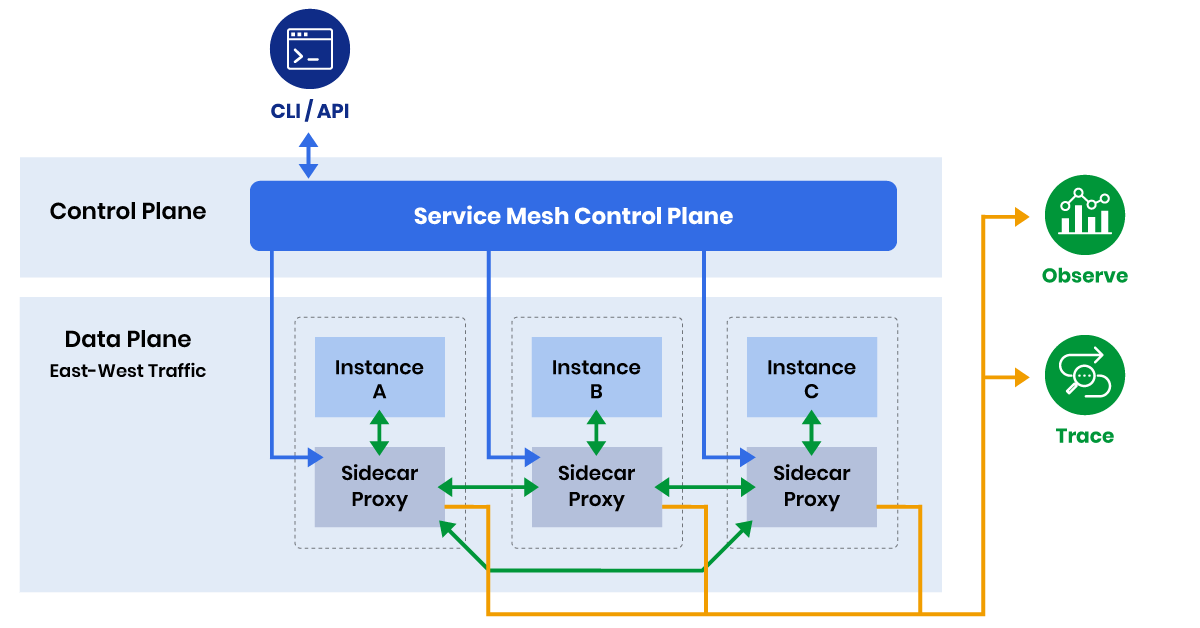


Every microservice runs with a proxy sidecar (usually Envoy).
All outgoing/incoming traffic passes through this proxy → mesh applies policies.
⭐ Why Use a Service Mesh?
💡 WITHOUT Service Mesh
You must write code for:
-
Retry logic
-
Circuit breaking
-
Load balancing
-
Authentication
-
Authorization
-
Distributed tracing
This leads to:
❌ Code duplication
❌ Inconsistent behavior across services
❌ Hard debugging
💡 WITH Service Mesh
Your services contain only business logic.
Communication logic moves to the mesh.
Benefits:
✔ Language-independent
✔ Centralized traffic control
✔ Auto mTLS → strong security
✔ Standardized retries, timeouts, circuit breakers
✔ Great observability (Jaeger, Grafana, Prometheus)
🔥 Popular Service Mesh Tools
| Mesh | Description |
|---|---|
| Istio | Most advanced and widely used, Envoy-based |
| Linkerd | Lightweight, very fast and simpler |
| Consul Connect | Good for hybrid cloud, multi-datacenter |
| AWS App Mesh | Managed service mesh on AWS |
🧩 Architecture: How Service Mesh Fits in Microservices
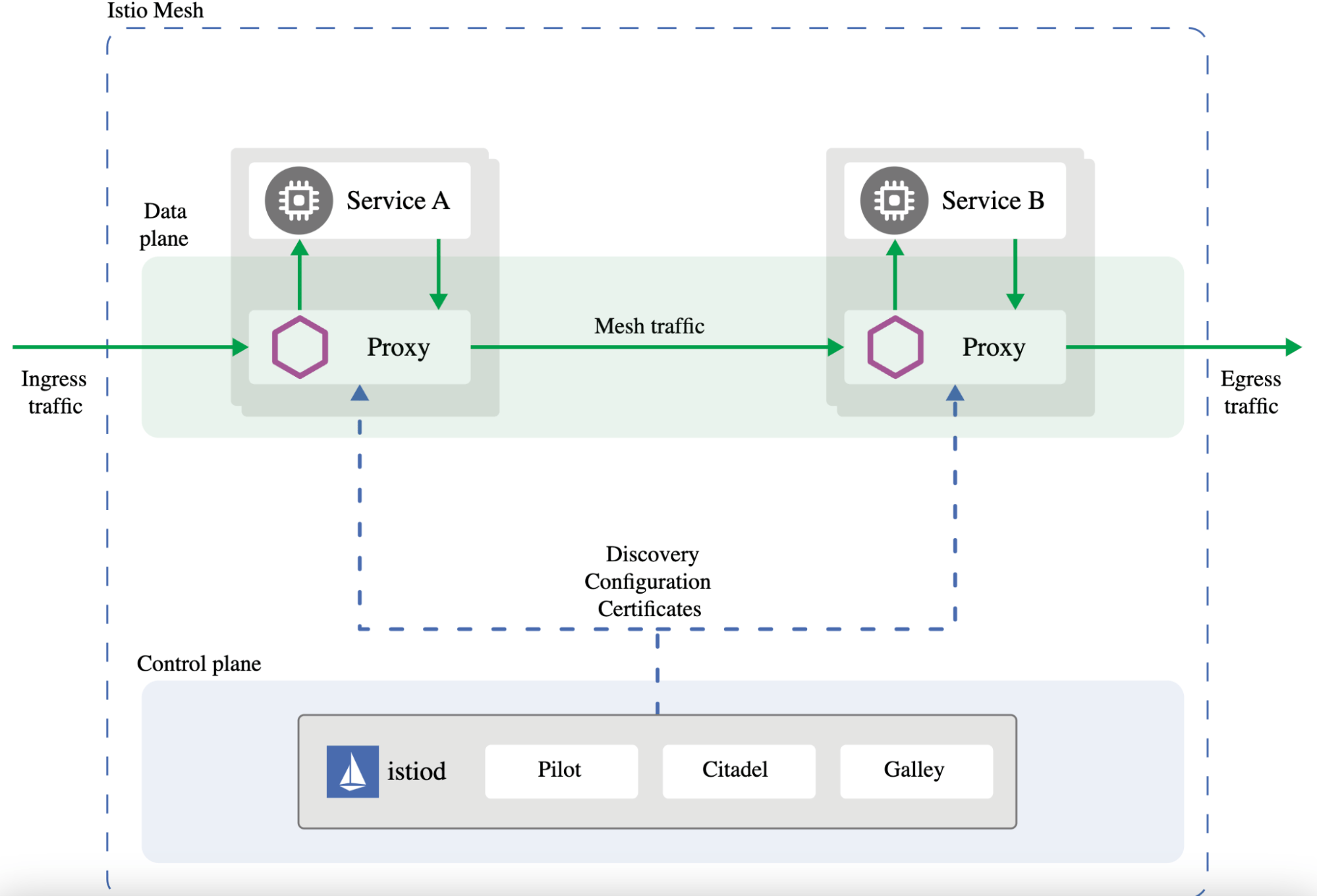


A Service Mesh has two planes:
1️⃣ Data Plane (Sidecar Proxies)
Runs next to each microservice.
Handles:
-
Service discovery
-
Load balancing
-
mTLS encryption
-
Retries / timeouts
-
Metrics & logging
2️⃣ Control Plane
Manages and configures the proxies.
Example (Istio components):
-
Pilot → traffic routing rules
-
Citadel → security & certificates
-
Mixer → telemetry & policies
🛠️ How to Implement Service Mesh in Microservices Development
Below are step-by-step instructions using Istio, the most common mesh.
🧭 Step 1: Deploy Microservices on Kubernetes
Service Mesh needs a container orchestrator like K8s.
You must have:
-
Kubernetes cluster (minikube / EKS / AKS / GKE)
-
Microservices packaged as Docker images
-
Services exposed via Kubernetes Service (ClusterIP)
🧭 Step 2: Install Istio on Kubernetes
Install using Istioctl:
istioctl install --set profile=demo -y
Verify:
kubectl get pods -n istio-system
🧭 Step 3: Enable Sidecar Injection
Your namespace must have auto-injection enabled:
kubectl label namespace default istio-injection=enabled
🧭 Step 4: Deploy Your Microservices
When you deploy your services now, Istio injects a sidecar automatically:
Example:
kubectl apply -f order-service.yaml
kubectl apply -f payment-service.yaml
Each pod now includes:
order-service-container
envoy-proxy-sidecar  ← Istio automatically adds this
🧭 Step 5: Apply Traffic Rules (Istio VirtualService & DestinationRule)
Example: Weighted Routing (Canary Deployment)
apiVersion: networking.istio.io/v1alpha3
kind: VirtualService
metadata:
  name: payment-service
spec:
  hosts:
  - payment-service
  http:
  - route:
    - destination:
        host: payment-service
        subset: v1
      weight: 90
    - destination:
        host: payment-service
        subset: v2
      weight: 10
This sends:
-
90% traffic → v1
-
10% traffic → v2
Great for canary releases.
🧭 Step 6: Enable mTLS (Service-to-Service Encryption)
apiVersion: security.istio.io/v1beta1
kind: PeerAuthentication
metadata:
  name: default
spec:
  mtls:
    mode: STRICT
All service communication becomes encrypted automatically.
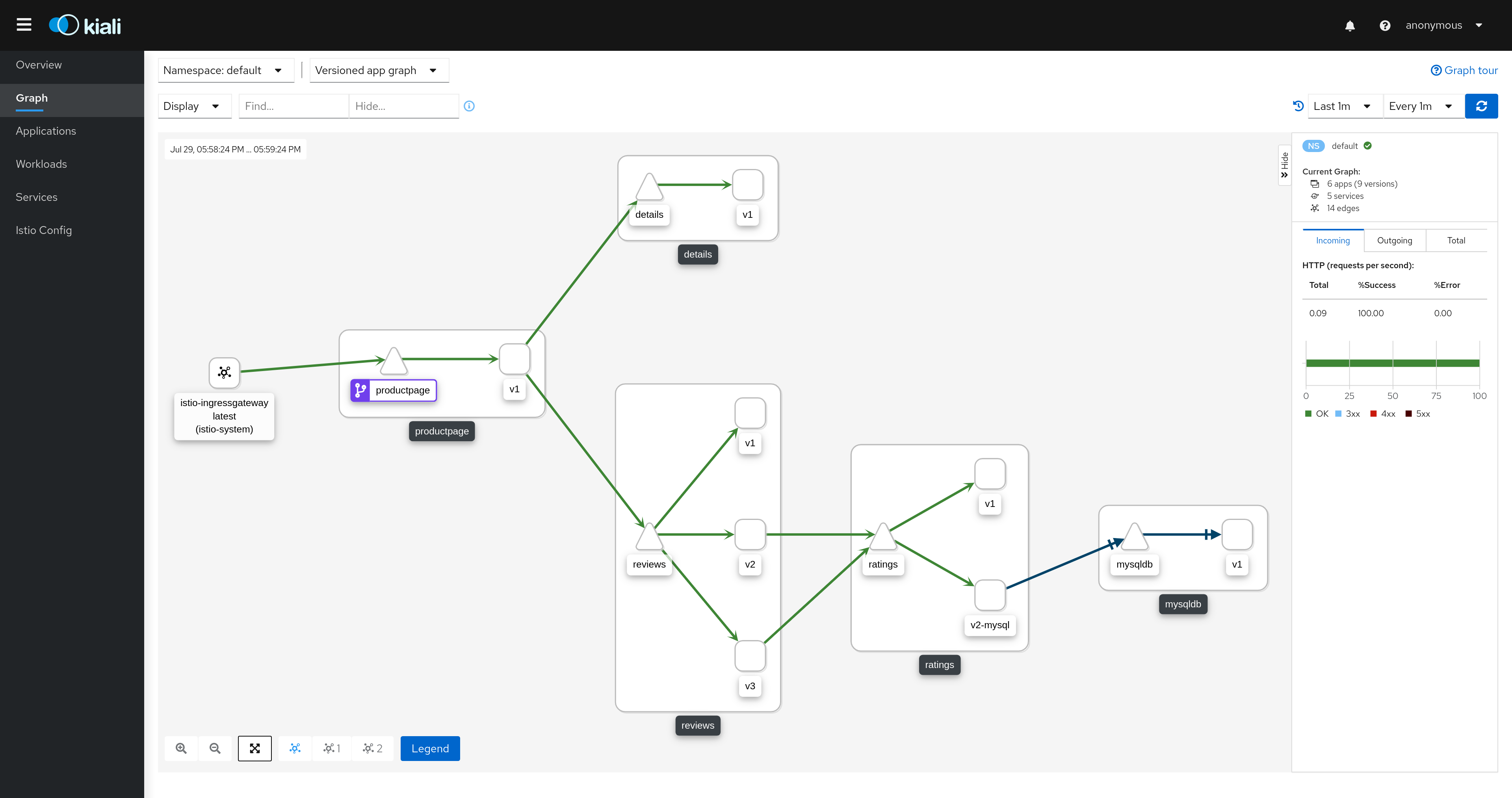
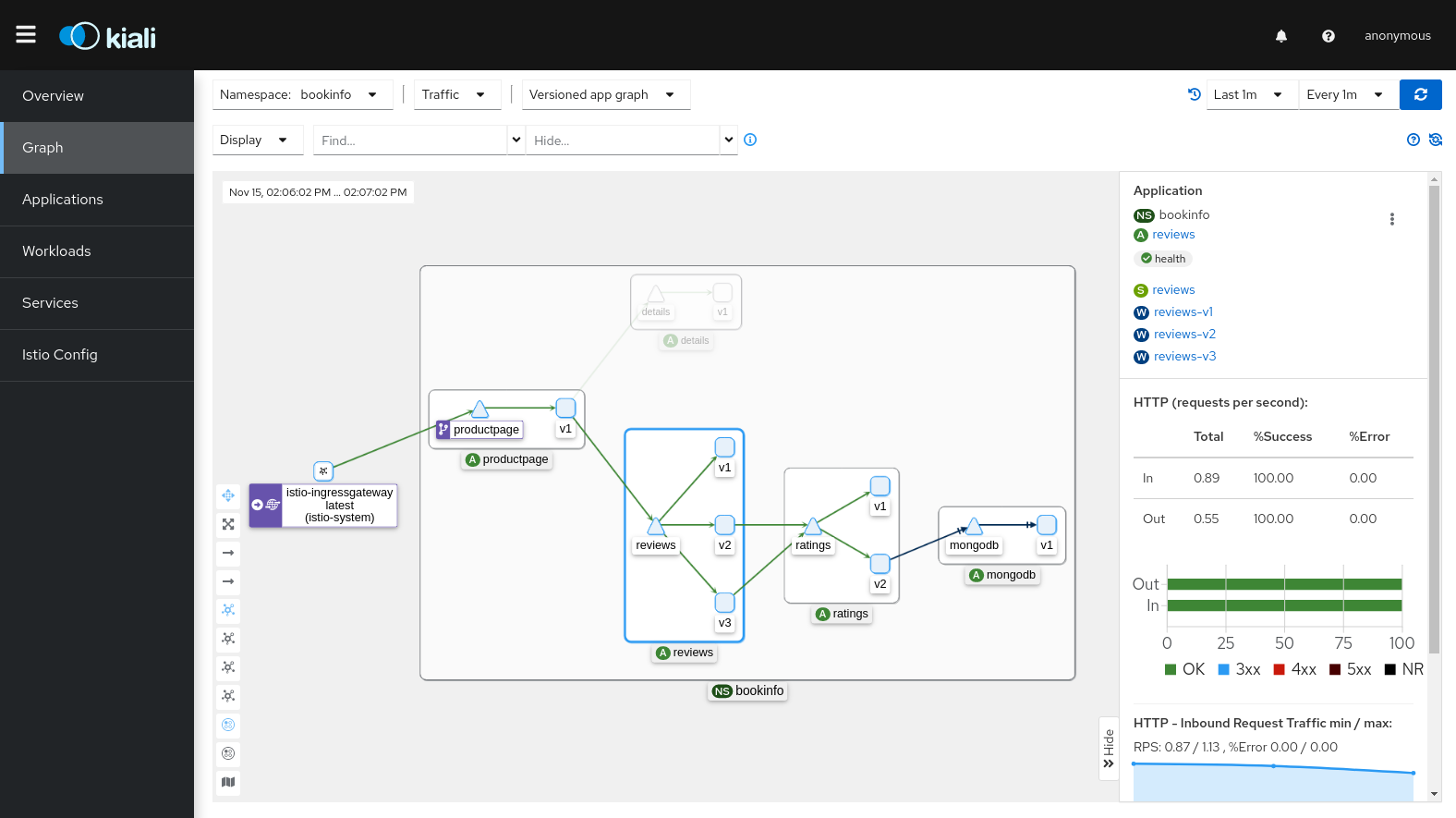
🧭 Step 7: Observe Traffic (Dashboards)
Service mesh supports:
-
Grafana
-
Kiali
-
Jaeger
-
Prometheus
Kiali gives you a real-time traffic graph:
🧨 Example Use Cases in Real Microservices
| Feature | What Service Mesh Solves |
|---|---|
| Retry Logic | No need to code retries manually |
| Zero-Downtime Deployments | Canary, blue/green routing |
| Security | mTLS between services |
| API Observability | Trace each request end-to-end |
| Fault Tolerance | Circuit breaker policies |
| Distributed Tracing | Jaeger / Zipkin integration |
⭐ Final Summary
Service Mesh = Traffic + Security + Reliability Layer for Microservices
It provides:
✔ Automatic load balancing
✔ mTLS security
✔ Traffic routing
✔ Observability
✔ Policy enforcement
It removes:
❌ Boilerplate code from microservices
❌ Inconsistent implementations
❌ Hard-to-debug networking issues
🎁 Want Next?
I can prepare:
✅ A complete microservices + service mesh architecture diagram
✅ Istio YAML templates for your microservices
✅ CI/CD integration with canary deployment
✅ Comparison: Istio vs Linkerd vs Consul
No comments:
Post a Comment