You cannot stop IPs from changing when containers restart — this is normal in Docker/Kubernetes.
But you CAN design your system so that IP changes do not affect communication at all.
Below are the best industry methods to restrict or avoid dependency on changing container IPs.
Clear explanation + diagrams included. 👇
✅ 1. Use a Service Discovery System (Best Solution)
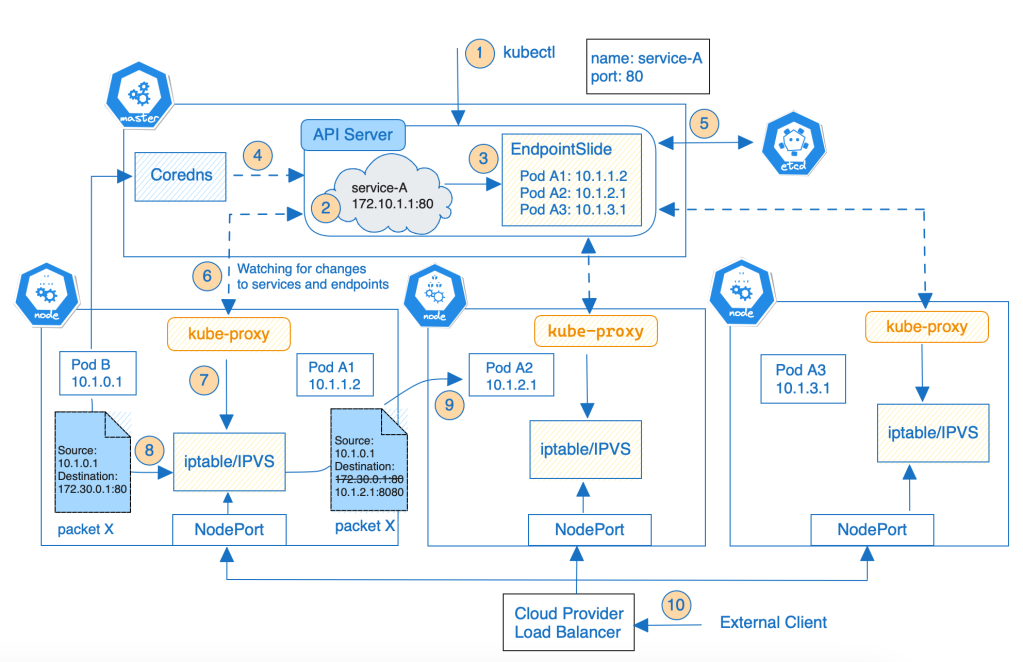
Instead of calling containers by IP, use a service name.
Example (Kubernetes)
Call like this:
http://payment-service
Kubernetes automatically maps it to the correct pod IPs.
Why it solves IP changes
-
Pods can die and restart
-
Their IPs change
-
But the service name stays constant

✅ 2. Use a Load Balancer or API Gateway
Instead of calling a container directly, call the load balancer.
Example
Client → API Gateway → Shipping Service Instances
Gateway automatically updates backend instance IPs.
Works in:
-
AWS ALB
-
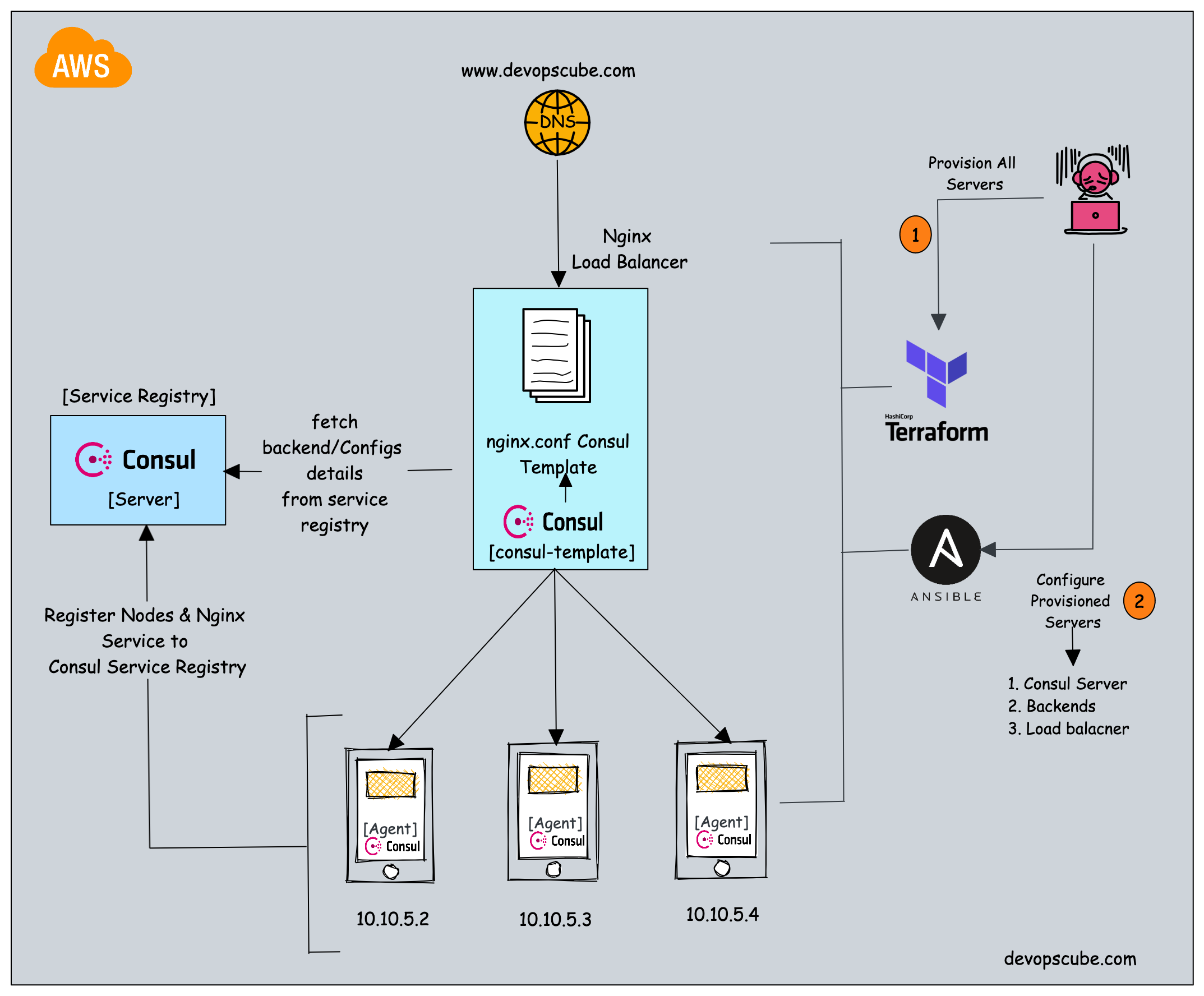
NGINX + Consul
-
Envoy
-
Istio
✅ 3. Use Docker Compose with Fixed Container Names
In Docker Compose, container-to-container calls stay stable using container names:
services:
  orders:
    container_name: orders-service
  payment:
    container_name: payment-service
Then call inside network as:
http://payment-service:8080
IP may change, but container name does NOT.
✅ 4. Use Static IPs (NOT recommended except very small setups)
You can force static IPs in Docker:
networks:
  mynet:
    ipam:
      config:
        - subnet: 172.20.0.0/16

services:
  app:
    networks:
      mynet:
        ipv4_address: 172.20.0.10
⚠ Why this is bad for microservices:
-
Breaks scalability
-
Manual management
-
Easy to conflict IPs
-
No automatic failover
Use this only for legacy system integration.
✅ 5. Use a Service Registry (Eureka / Consul)
Services register themselves on startup.
Example:
Order Service → Eureka Registry
Payment Service → Eureka Registry
Client → Eureka → Correct Instance IP
When container restarts:
-
Eureka updates IP automatically
-
No system downtime

⭐ BEST PRACTICE SUMMARY
| Approach | Solves IP Change | Scalable | Recommended |
|---|---|---|---|
| Kubernetes Service | ✅ | ⭐⭐⭐⭐⭐ | 👍 Best |
| API Gateway / Load Balancer | ✅ | ⭐⭐⭐⭐⭐ | 👍 Best |
| Eureka / Consul | ✅ | ⭐⭐⭐⭐ | 👍 Very Good |
| Docker Static IP | ❌ | ⭐ | 👎 Not recommended |
No comments:
Post a Comment